Sideways by default: no overlay, no waiting — just the game e77e000
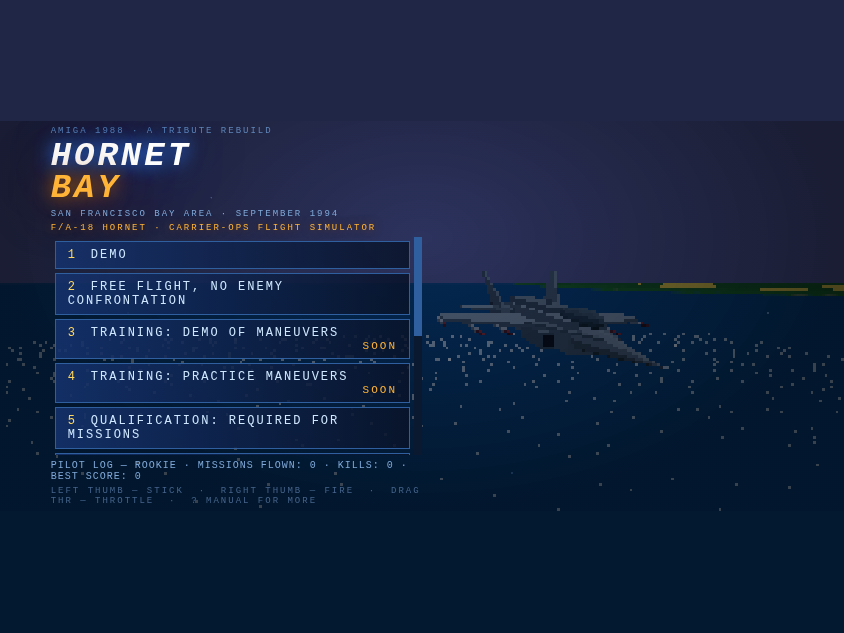
Product call from the boss: "Instead of waiting for the phone to rotate, just serve the game and fix for landscape. The user will figure it out." Correct. So the ROTATE YOUR DEVICE overlay is gone. A phone held upright now gets the game immediately — the whole thing laid out for landscape and spun 90 degrees, menu included (above). It looks sideways on an upright phone; the pilot turns the phone; done. The gyro, once permitted (one tap, asked on the first touch), simply flips which way the game spins if they turned the "wrong" way, and a viewport that genuinely rotates to landscape always wins natively. Rotation lock is now fully irrelevant either way.
Serving the menu inside a portrait viewport surfaced two fun bugs. One: engaging the spin at startup called the resize path before the HUD module existed — a TDZ crash that only fired in portrait, leaving the menu unbuilt (thank you, errbox). The re-layout is now deferred a frame. Two: the compact phone menu is gated on @media (max-height: 480px) — and a portrait viewport is 844 tall, so the full-size desktop menu rendered into a 390-tall game screen and the flex column crushed the button list to 33 pixels. The compact rules are now replicated under sideways mode, along with swapped vw/vh units throughout, and the suite checks the menu is genuinely tappable through the rotation: 51/51.